Press "Enter" to skip to content

//> A L C A T R O N . N E T //> Posts

Netdisco 2 Service Startup Script Centos/Redhat

I have been trying out the new package of Netdsico 2 from https://metacpan.org/pod/App::Netdisco and I must say im quite impressed by the new version, it has a new interface and its quite smooth to operate. Everything is bundled inside the package and deployed part as of CPAN. Its quite a bit different than Netdisco 1 in terms of installing and configuring, and it is bit easier to work with.

One of the things which I needed was a startup script to start the netdisco-daemon and netdisco-web service on Red Hat / Centos, so I built a custom service to operate it.

Simply download netdisco-web  and netdisco-daemon files , remove the .txt extension, and drop them into /etc/init.d on your redhat/centos system using WinSCP or similar.

Once the files are in there add execute privilege, go into /etc/init.d using terminal

[root@centos init.d]# chmod +x netdisco-daemon 
[root@centos init.d]# chmod +x netdisco-web

Then add the files as part of the startup process

[root@centos init.d]# chkconfig --add netdisco-daemon 
[root@centos init.d]# chkconfig --add netdisco-web 
[root@centos init.d]# chkconfig netdisco-daemon on --level 2345 
[root@centos init.d]# chkconfig netdisco-web on --level 2345

Lets check the startup run levels, looks good

[root@centos init.d]# chkconfig --list | grep netdisco
netdisco-daemon 0:off 1:off 2:on 3:on 4:on 5:on 6:off 
netdisco-web 0:off 1:off 2:on 3:on 4:on 5:on 6:off


Now lets check the service


[root@centos init.d]# service netdisco-web start Netdisco Web [Started] 
[root@centos init.d]# config watcher: watching /home/netdisco/environments for updates. 
[root@centos init.d]# service netdisco-daemon start Netdisco Daemon [Started]
 config watcher: watching /home/netdisco/environments for updates.

We can see it is working well.

We can then pass the “help” parameter what the service offers

[root@centos init.d]# service netdisco-daemon help Usage: {start|stop|restart|status|help} 
[root@centos init.d]# service netdisco-web help Usage: {start|stop|restart|status|help}

I finally have my netdisco 2 service operational and working well. The bootup scripts have been made so that it allows postgresql to startup first which netdisco relies on, then the daemon and then finally the web.

I haven’t tested on other linux platforms, but i’m sure it will be operational as well with possibly a few tweaks. Hopefully it will assist you too.

Leave a Comment

Configuring Cisco ASA 5506-X IPv6 with Prefix Delegation (PD)

On the 24 August 2016 Cisco released new ASA code 9.6.2 adding further support to the IPv6 protocol – Prefix Delegation. Recently Telstra (Australian ISP) has enabled IPv6 on NBN (National Broadband Network) services and I thought what better way to try out this than on my ASA 5506-X. I will go through the basic process on getting IPv6 to work on a Cisco ASA with PD.

In the steps below GigabitEthernet1/1 is the outside interface, and GigabitEthernet1/2 is the inside interface.

1)The first step is configuring IPV6 on the outside interface. At this point, no IPV6 address will be configured in the firewall.

interface GigabitEthernet1/1
 ipv6 address autoconfig default trust dhcp
 ipv6 address dhcp default
 ipv6 enable
 ipv6 nd managed-config-flag
 ipv6 nd other-config-flag
 ipv6 dhcp client pd ciscoasa

2) The ISP will provide the prefix which has to be used, and some data has to be collected by using the following commands:

show ipv6 dhcp interface outside

With this, you will have the info about the default-dateway (Reachable via address) and the subnet assigned by the ISP (Prefix)

GigabitEthernet1/1 is in client mode
 Prefix State is OPEN
 Renew will be sent in 01:37:04
 Address State is SOLICIT
 List of known servers:
 Reachable via address: fe80::fac0:1ff:fe70:17c0
 DUID: 000100011914BB0A00144FFA6B62
 Preference: 0
 Configuration parameters:
 IA PD: IA ID 0x00020001, T1 7200, T2 11520
 Prefix: 2001:8003:a02c:8700::/56
 preferred lifetime 14400, valid lifetime 14400
 expires at Sep 01 2016 03:40 AM (13024 seconds)
 Information refresh time: 0
 Vendor-specific Information options:
 Enterprise-ID: 1088
 Prefix name: ciscoasa

3)Then, we need to configure the interfaces with these IP address. So, with the command show ipv6 interface, we can find the IPV6 link local for the outside interface, and configure the IPV6 address using its eui-64 portion

outside is up, line protocol is up
   IPv6 is enabled, link-local address is fe80::5287:89ff:fefc:7106

With these 2 pieces of information, we can configure the IP address to be used in the outside interface and also configure the ipv6 dhcp client pd hint. This command is necessary to ask the ISP to always provide the same IPV6 prefix so that we will keep it as if it were a static assignment.

interface GigabitEthernet1/1
 ipv6 address ciscoasa ::5287:89ff:fefc:7106/64
 ipv6 dhcp client pd hint 2001:8003:a02c:8700::/56

Note: On Telstra residential services I discovered they do not interpret the PD HINT and keep the subnet, so I have left out this line as of March 2017.

In this case, the outside network will have the following subnet 2001:8003:a02c:8700::/64

We can also configure the IPV6 default gateway with the IPV6 link- local address provided by Telstra router

show ipv6 routers 
 ! Will show the link-local address to be used as the default gateway)
 Router fe80::fac0:1ff:fe70:17c0 on outside, last update 9 min
   Hops 64, Lifetime 1800 sec, AddrFlag=1, OtherFlag=0
   Reachable time 0 msec, Retransmit time 0 msec

ipv6 route outside ::/0 fe80::fac0:1ff:fe70:17c0

4) Next step is configuring the inside interface. We defined the subnet to be used so that it would not overlap the outside interface 2001:8003:a02c:8701::/64

interface GigabitEthernet1/2
 ipv6 enable
 ipv6 address 2001:8003:a02c:8701::/64 eui-64
 ipv6 nd managed-config-flag
 ipv6 nd other-config-flag

Note: On Telstra residential services the Ipv6 /64 Address will not be static. We will have to change to the following for dynamic assignments:

ipv6 address ciscoasa ::1:0:0:0:1/64

The “::1:0:0:0:1/64“  is basically the host portion of the IP address. The “ciscoasa” in this case contains the IPv6 prefix and when the ASA configures the IP address it will use the prefix and include the host portion as well and then create the IP address.
This way when the ASA reboots or looses power a new address will be ready to use if the ISP gives out dynamic /56's.

Also, a IPV6 DHCP scope was configured. In this case, it works as a stateless DHCP, as the interface will only provide the subnet used in the router advertisements and each host will include its eui-64 information to complete. In the case below I have also added in the Telstra IPv6 DNS servers however you can add your own in, or you can use import dns-server to automatically try get a server.


ipv6 dhcp pool ALCATRONV6
dns-server 2001:8000:101::1
dns-server 2001:8000:101::2
domain-name alcatron.net

interface GigabitEthernet1/2
 ipv6 dhcp server ALCATRONV6

5) Finally we can verify that the hosts are being able to get IPV6 subnet and configure their own IPV6 addresses

ciscoasa-5506X# sh ipv6 neighbor | inc 2001

2001:8003:a02c:8701:497f:8a80:b975:d580    30 a4b8.058e.8236  STALE inside
 2001:8003:a02c:8701:d565:2f36:d9b:32a7     39 1c5c.f2b4.6cad  STALE inside
 2001:8003:a02c:8701:7c57:4bd5:bb68:1b9     17 a4b8.058e.8236  STALE inside
 2001:8003:a02c:8701:c122:30ca:7b52:42ea     9 1c5c.f2b4.6cad  STALE inside
 2001:8003:a02c:8701:5f:860c:b32b:c7        43 0015.5d01.0602  STALE inside
 2001:8003:a02c:8701:597e:471f:bfd9:df3f     0 0cc4.7a70.a0a7  REACH inside
 2001:8003:a02c:8701:6820:c272:e85e:2feb    20 7081.eb1a.c6e5  STALE inside
 2001:8003:a02c:8701:f4d4:b595:88f8:374d    40 1c5c.f2b4.6cad  STALE inside
 2001:8003:a02c:8701:8574:1c6f:5fd6:1f1b    43 20c9.d07a.5777  STALE inside

And verify the IPV6 connections

ciscoasa-5506X# show conn | inc 2001

TCP outside  2404:6800:4006:806::2003:80 inside  2001:8003:a02c:8701:c122:30ca:7b52:42ea:51324, idle 0:00:32, bytes 15286, flags UIO
 TCP outside  2404:6800:4006:806::2005:443 inside  2001:8003:a02c:8701:c122:30ca:7b52:42ea:51333, idle 0:00:14, bytes 630639, flags UIO
 TCP outside  2a03:2880:f019:1:face:b00c:0:1:443 inside  2001:8003:a02c:8701:c122:30ca:7b52:42ea:51194, idle 0:02:03, bytes 17643, flags UIO
 TCP outside  2a03:2880:f019:1:face:b00c:0:1:443 inside  2001:8003:a02c:8701:c122:30ca:7b52:42ea:51193, idle 0:01:23, bytes 8865, flags UFRIO


Other useful commands you will need:

sh ipv6 interface
 ! show the configured IPV6 addresses and subnet masks
 outside is up, line protocol is up
   IPv6 is enabled, link-local address is fe80::5287:89ff:fefc:7106
   Global unicast address(es):
     2001:8003:a02c:8700:5287:89ff:fefc:7106, subnet is 2001:8003:a02c:8700::/64
   Joined group address(es):
     ff02::1:fffc:7106
     ff02::2
     ff02::1
sh ipv6 general-prefix
 ! Will show your prefix acquired via PD lifetime
 IPv6 Prefix ciscoasa, acquired via DHCP PD
   2001:8003:a02c:8700::/56 Valid lifetime 11664, preferred lifetime 11664
    Consumer List                Usage count
     outside (Address command)   1

Another issue I had is trying to get traceroute working correctly so to make sure this was working correctly i had to ensure I had the following lines. This allows ping, and echo reply to all your inside IPv6 hosts, you can tweak this however if you like with the access lists.

access-list Outside_access_in extended permit icmp6 any6 any6 echo-reply
access-list Outside_access_in extended permit icmp6 any6 any6 time-exceeded
access-list Outside_access_in extended permit icmp6 any6 any6 unreachable
access-list Outside_access_in extended permit icmp6 any6 any6

The policy maps were modified to ensure that traceroute v4 and v6 worked. You might have others in the policy-map, just leave those and append the ones below that are missing.

policy-map global_policy
 class inspection_default
   inspect icmp
   inspect icmp error
 class class-default
   set connection decrement-ttl

service-policy global_policy global


This was a steep learning experience, but finally I have dual stack IPv4 and IPv6 running on Telstra NBN through a Cisco ASA 5506-X. I have seen no articles which deal with PD delegation on Cisco ASA’s , so I thought i would do this write up so that it can benefit others. Any questions, comments, feedback, welcome as usual 🙂
5 Comments

Cisco ASA 5506-X IPv6

On the 24th of August 2016 Cisco released version 9.6.2 of its ASA software. The new version brings in more IPv6 support for the platform.

The ASA now supports the following features for IPv6 addressing:

  • DHCPv6 Address client—The ASA obtains an IPv6 global address and optional default route from the DHCPv6 server.
  • DHCPv6 Prefix Delegation client—The ASA obtains delegated prefix(es) from a DHCPv6 server. The ASA can then use these prefixes to configure other ASA interface addresess so that StateLess Address Auto Configuration (SLAAC) clients can autoconfigure IPv6 addresses on the same network.
  • BGP router advertisement for delegated prefixes
  • DHCPv6 stateless server—The ASA provides other information such as the domain name to SLAAC clients when they send Information Request (IR) packets to the ASA. The ASA only accepts IR packets, and does not assign addresses to the clients.

If you have loaded the new software how did you go in getting IPv6 working in your environment ?

At the moment I am trialing the new software on my carrier, to see whether I can get the full IPv4 and IPv6 dual stack working on the ASA platform.

Leave a Comment

Cisco 5506-X WAN Speedtesting

I recently got the new Cisco 5506-X and I thought to benchmark the WAN speed on it and see what it can actually push. I got 3 x 100mb WAN links and connected them in and assigned 3 outside interfaces and decided to run a 5GB speedtest file on each link terminating. I used the PBR (Policy Based Routing) on the device to and some access lists to forward traffic where I wanted it to go.
Here are some of the specs of the 5506-X using show version:

Hardware:   ASA5506, 4096 MB RAM, CPU Atom C2000 series 1250 MHz, 1 CPU (4 cores)

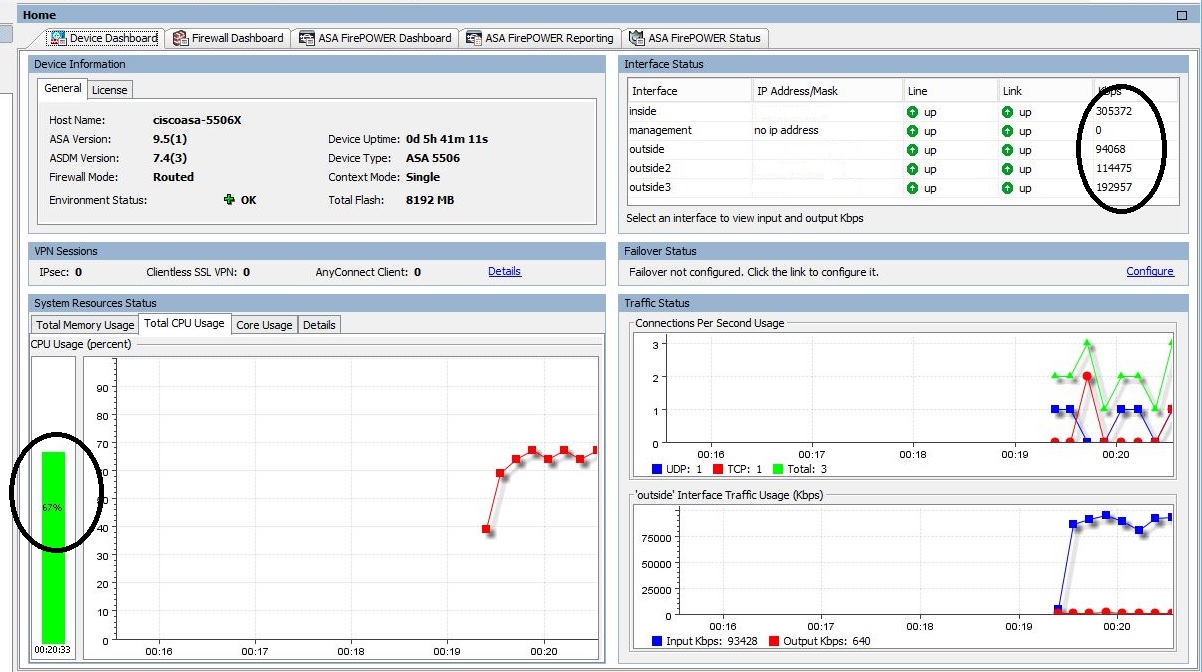
Upon testing and maxing the speed at 300mbit across 3 interfaces, the CPU on the device reached to 67%. This is only with the firewall on, and no other features turned on such as the Firepower. Upon looking at the Cisco documentation they mention at minimum it will do is 750mbit for firewall performance. If 3 WAN links @300mbit already reach 67% CPU, if I did add another link it, the CPU will nearly be maxed out at 400mbits. In my opinion, I think the 750mbits will not be reached or very difficult to get to as the CPU on the device will be quite high and packets might start getting dropped. Anyone else done speedtesting on it? Let me know your thoughts!

Here is a screenshot of the WAN performance of the ASA 5506-X @ 300mbit.

Cisco ASA5506-X
Cisco ASA5506-X @ 300mbit WAN speed


7 Comments

NBN Fiber is Active

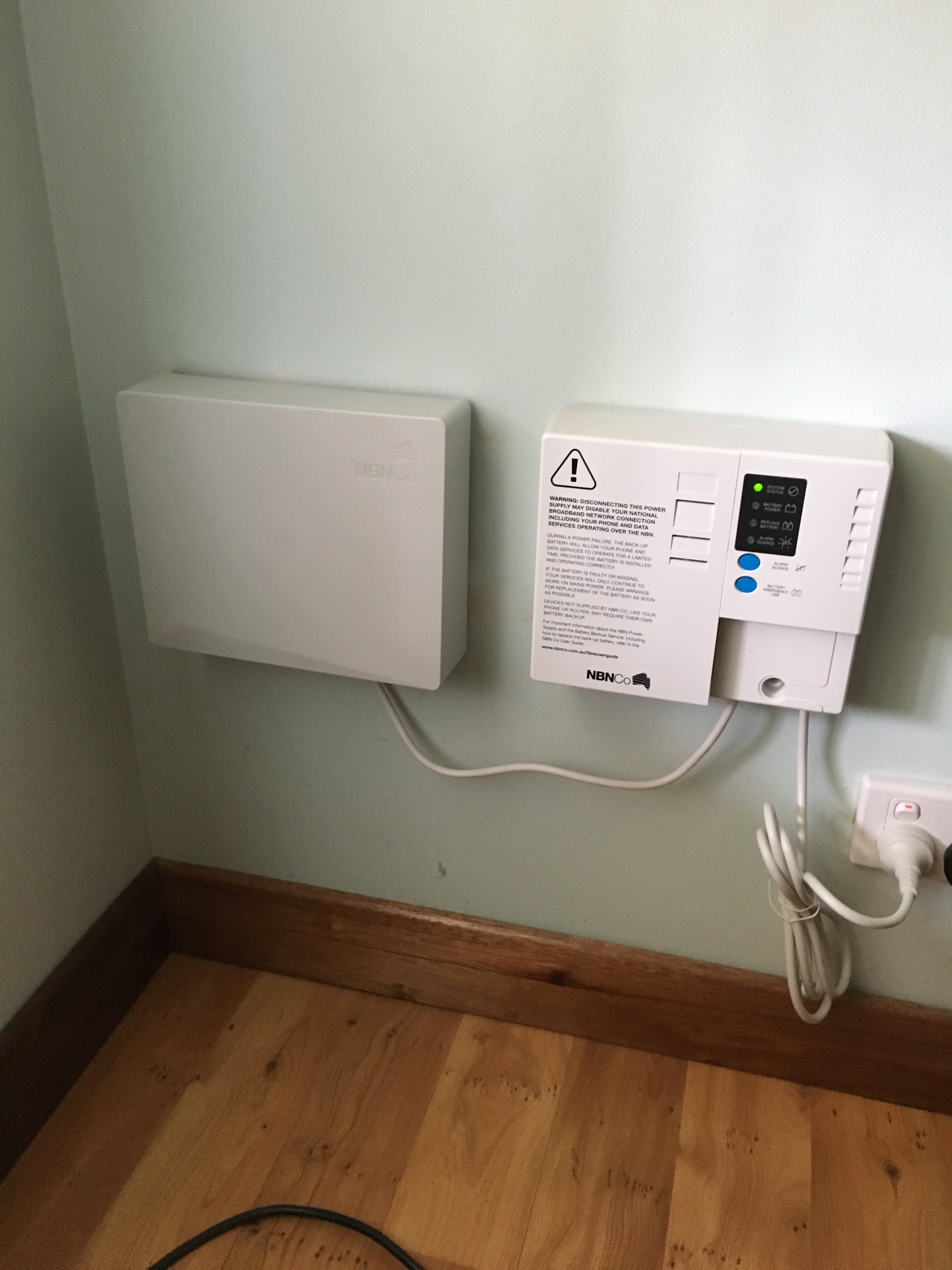
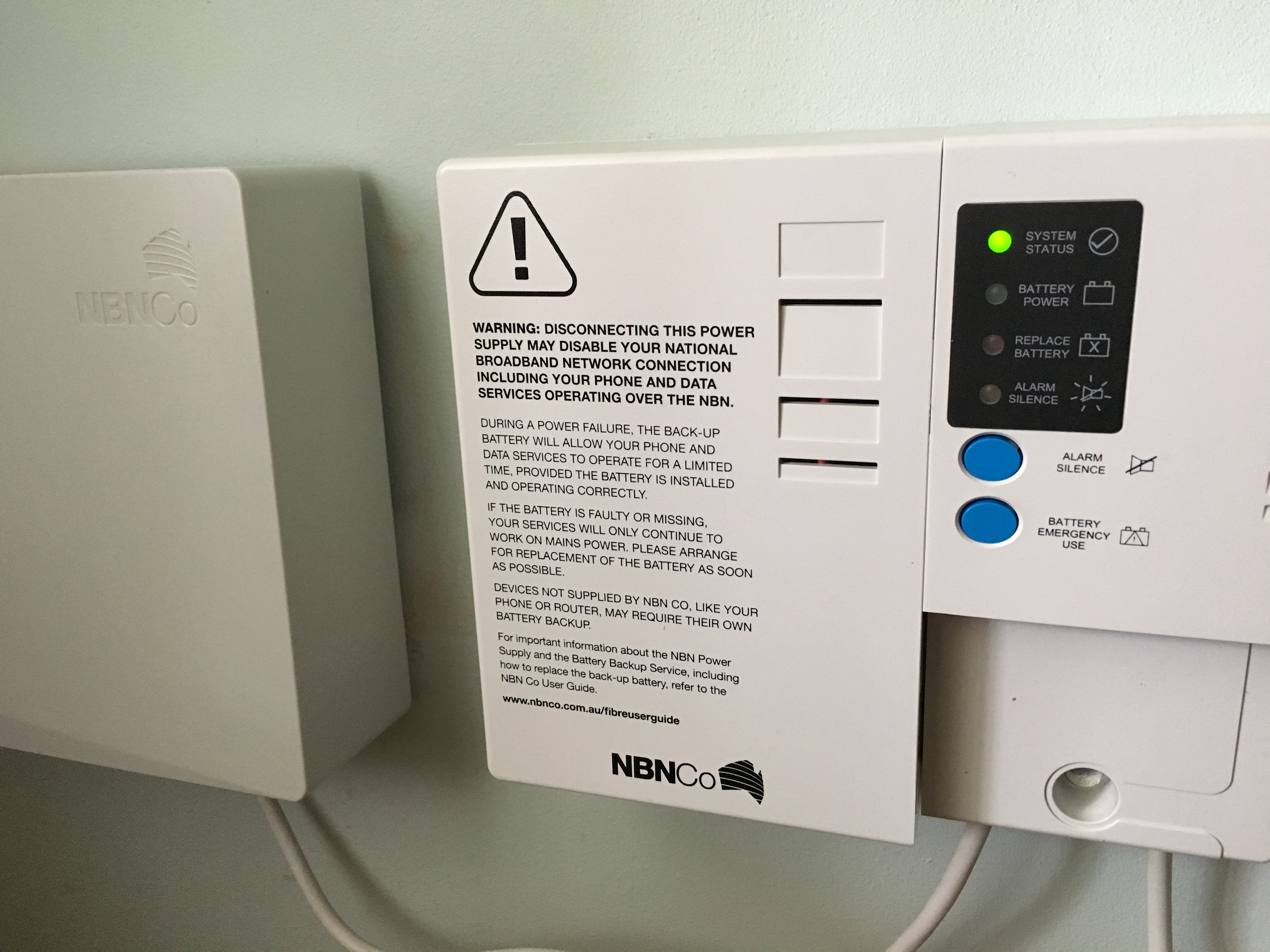
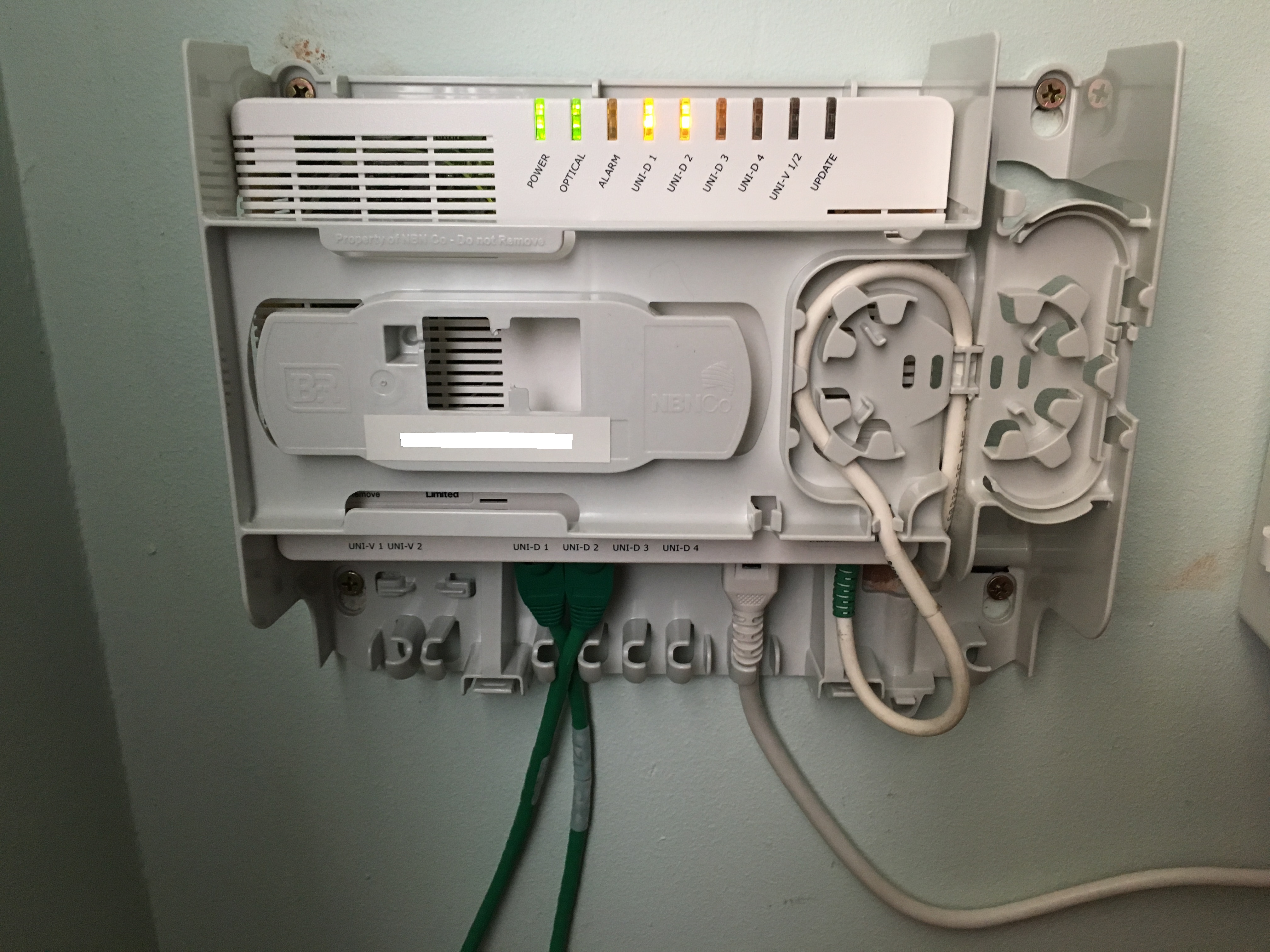
I finally managed to get NBN Fiber activated at my place. I have purchased a Cisco 5506-X to service the NBN Link to terminate 2 x 100/40mb services as this is the max available speed per carrier. I plan on using the Policy Based Routing function on the Cisco 5506-X to load balance the links a bit and setup traffic types and how it should flow. I will later document my config of the Cisco and the funky type PBR I have setup on it.  The NBN box offers 2 voice ports and 4 ethernet ports. The 4 Ethernet Ports can provide up to 4 ISPs to service the traffic to your premise. Since I have dual links at present techincally I have a 200/80 link load balanced on the ASA which is quite nice 🙂

Here are some of the photos of my setup and how its functioning, in a later post I will go through the 5506-X configuration.

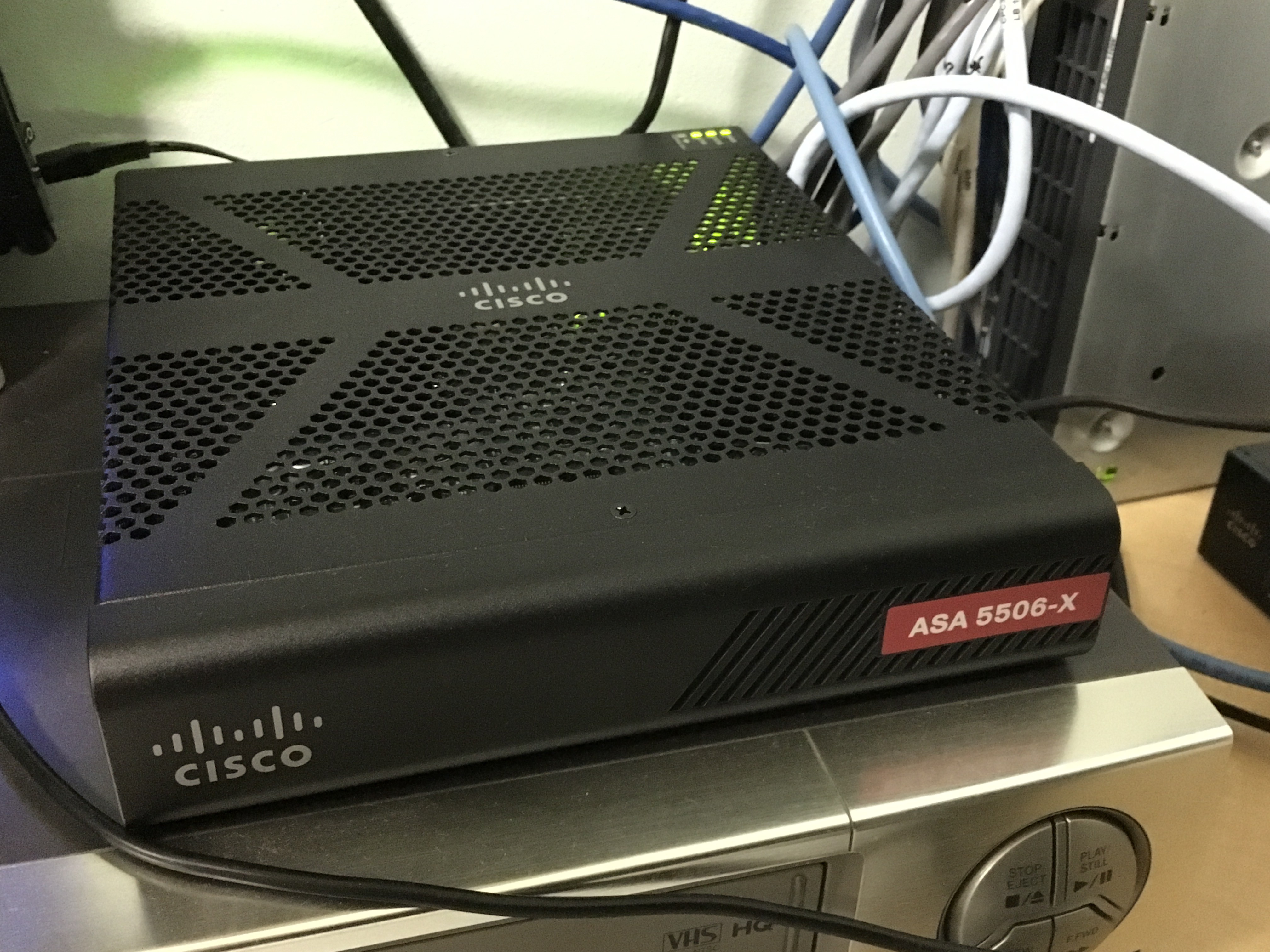
Cisco ASA 5506-X
Cisco ASA 5506-X on NBN
NBN Switch and Battery Backup
NBN Battery Backup
NBN Battery Backup
NBN Switch
NBN Switch, LEFT: 2 voice ports, MIDDLE: 4 Ethernet Ports, RIGHT: Fiber Optic Cable termination
Leave a Comment

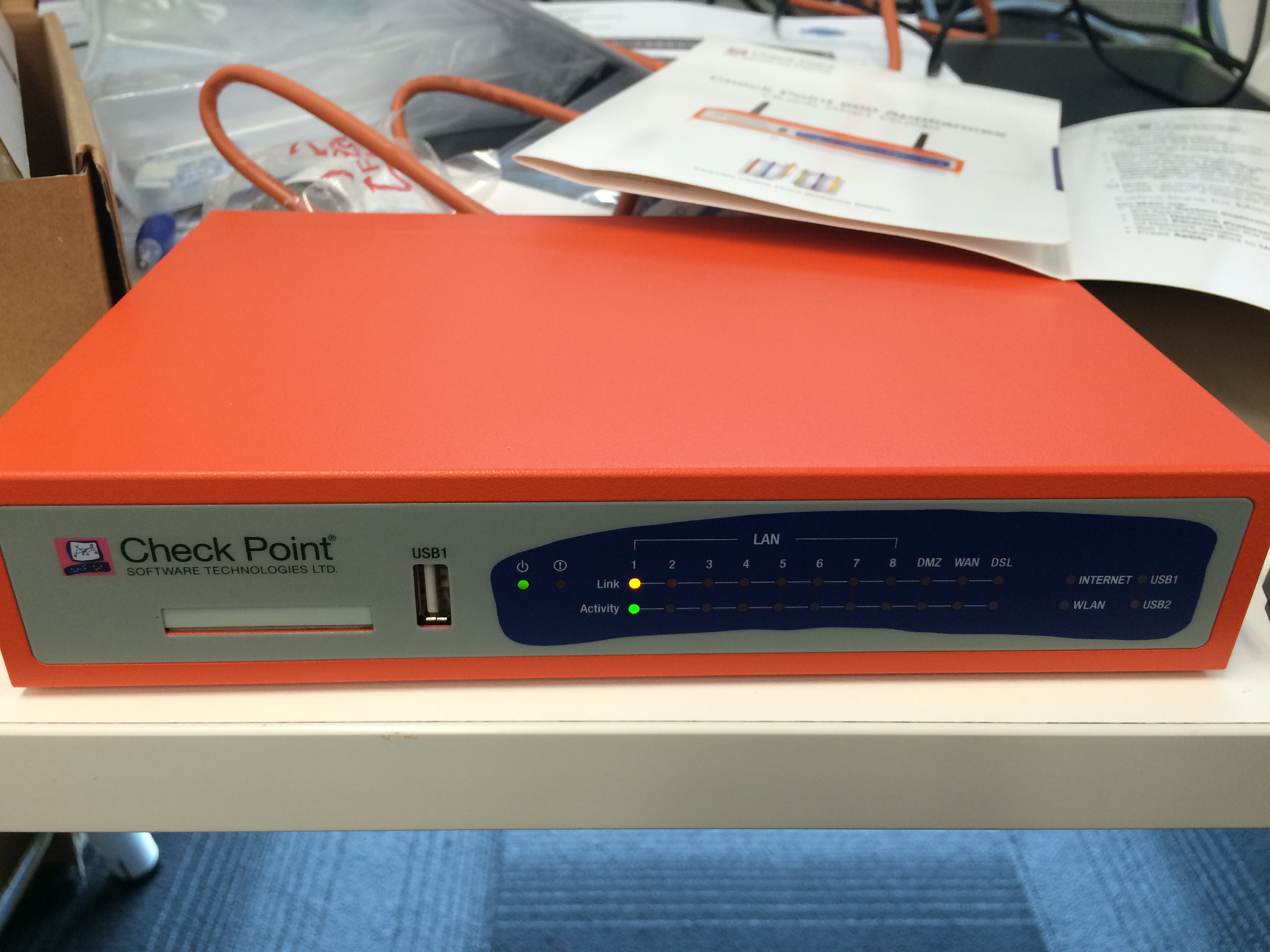
Warning: Do not buy Checkpoint 680 for High Speed WAN Links

Hello again, i thought I might make some further updates to my blog and what has been happening recently. A few months ago I decided that I wanted to replace my Cisco ASA5505 with something newer that offered gigabit ports and somewhat stronger firewall etc. At work we have removed Cisco from the firewall infrastructure and replaced it with Checkpoints, so I thought checkpoint is the way to go. The device I purchased was Check Point 680 + Wi-Fi + ADSL + 3 Yr [CPAP-SG680-NGTP-WDSLA-W-3Y-BUN] with a 3 year support agreement. It costed me about $1515 AUD, and upon talking to the Checkpoint reseller this device would be able to handle 100mbit link as I was going to be upgrading to a 100/40 NBN Fiber Service in Australia, and probably having dual 100/40 links terminating into this device.

Upon opening everything and getting it up and running, it was a breeze and simple and looked very impressive. Upon starting to download my first 5GB speedtest file from a HTTP server, and all the blade modules turned on, with AV, IPS, Firewall, Spam etc, the device severely underperformed and I was only able to achieve 30-40mbit. When checking the CPU on the device it was reaching 100% and everything was so unresponsive. I then turned off all the blades except the firewall and it only managed around 60mbit which again is very poor. The specification sheet shows clearly this device can handle 1.5Gigabits of throughput traffic when firewalled, try about 60mbit instead, quite pathetic from Checkpoint. Even when doing the large file transfer, pinging the checkpoint device itself inside the LAN was slow and unresponsive with pings 500+ ms which was crazy. I complained to the reseller this device is not worth the price I paid for as the speed is awful, and they got me intouch with a local checkpoint engineer. The engineer advised to upgrade the software on the device with a later one, so I did but still performance was bad and certainly nowhere near impressive to a Cisco ASA. He advised to consult with checkpoint directly and see what they can do.

I logged a case with checkpoint directly, telling them this device does perform as per specifications and has severe issues in terms of performance and it cannot handle a 100mb WAN link. This is the conversation I had with them as per below:

2:22 PM Checkpoint : Can you pass the FTP file now?
2:22 PM Customer: ok
2:23 PM Checkpoint : It looks ok
2:23 PM Customer: see the pings to the gateway
2:23 PM Customer: when i login to web interface
2:23 PM Customer: pings go up
2:23 PM Customer: like crazy
2:24 PM Checkpoint : What happens when you ping through the appliance, and not directly to it?
2:25 PM Customer: same thing
2:26 PM Customer: all the pings  increase
2:26 PM Customer: i use also cisco asa 5505 dont have such issue
2:26 PM Customer: when i swap
2:27 PM Checkpoint : That’s an expected behavior since the appliance Web UI logging take the most CPU
2:27 PM Customer: yes but it shouldnt affect speeds and latency
2:28 PM Customer: for everyone while im browsing the appliance
2:29 PM Checkpoint : When logging the device Web UI the SFWD process CPU jump and of course it impact latency and performance
2:29 PM Checkpoint : What is the device firmware version ?
2:29 PM Customer: but for a device of this price
2:29 PM Customer: that shoudl not be a problem
2:31 PM Checkpoint : I understand but I can confidently say it’s a normal behavior
2:32 PM Customer: yeah well i disagree with that
2:32 PM Customer: i have a 5 year old asa
2:32 PM Customer: the pings do not jump
2:32 PM Customer: to the gateway
2:33 PM Customer: see im not even touching just transferring files
2:33 PM Customer: and pings increase
2:33 PM Checkpoint : You don’t need too, as long as you connected to the web UI the httpd watchdog eats the CPU
2:33 PM Checkpoint : I  know
2:33 PM Customer: and then i turn on all the features
2:33 PM Customer: and initiate my transfer
2:33 PM Checkpoint : I might have workaround that may improve the device performance
2:33 PM Customer: it kills the device
2:34 PM Customer: and doesnt respond
2:34 PM Checkpoint : Want to try it ?
2:34 PM Checkpoint : I can send you a link for the new version that might improve the device’s performance
2:35 PM Customer: ok but the checkpoint engineer said to use this one as its latest
2:35 PM Customer: is there one newer than 77.20
2:36 PM Checkpoint : There is a new version that released two days ego and it contains a fix that might can improve the performance
2:37 PM Checkpoint : And this is the best effort I can do regarding this issue
2:37 PM Checkpoint : Would you like to test it ?
2:37 PM Customer: ok
2:37 PM Customer: whats the changes in the new version
2:38 PM Customer: what does the R&D think about this ?
2:38 PM Checkpoint : Wait a second I need to check few things
2:41 PM Checkpoint : I’m sorry , I just rechecked the device features cannot handle with high speed such you using 100MB
2:41 PM Checkpoint : I doubt if the new version will make any difference
2:42 PM Customer: so what handles 100mb with all the features on?
2:43 PM Checkpoint : A strong Check Point  device but not the 600

So there as you see above, proof a Checkpoint 680 cannot handle high speed WAN links, so do not buy one! Luckily I was able to return it and get a refund, as the price for it $1500+ is certainly not worth it.

Checkpoint 680
Checkpoint 680 Firewall
5 Comments