Press "Enter" to skip to content

//> A L C A T R O N . N E T //> Posts

OID value to graph stats

If you wish to perform any type of graphing in MRTG/Cacti on a network device to look at the SNR, Attenuation, Downstream speed, errors, packets etc they all would be stored in a OID number.

For example I have a new router with SNMP enabled and I wish to graph the downstream SNR (Signal To Noise) margin over a set period of time into Cacti. How would I accomplish this without having any specific templates or knowledge about my router? Well there is a tool out there called “GetIf”, and what this tool does it allows you to probe your network device and it scans for all the OID values of the modem.

So for example in my below screenshot I have just scanned my router for values and I got a report, and then I looked through the values it found and then I tried locating the SNR value and what was matching to the modem.

In the program “GetIf” the mbrowser tab is used to scan for OID values. As in my case I have managed to find the downstream SNR OID value as .1.3.6.1.2.1.10.94.1.1.3.1.4.4, and this OID number we can then use on our cacti/mrtg template to graph this over time.

However this is not the only thing the program can do..

“GetIf is  much more than an SNMP browser however, with the ability to graph OID values over time, display the device’s interface information, routing and ARP tables, as well as do basic port scans, Traceroutes, NSLookups, and IP Scans”

For more info please visit the website: http://www.wtcs.org/snmp4tpc/getif.htm

[ad#googleadd1]

Leave a Comment
Cisco 877 Config [Internode] [PPPoA]

Here is a sample 877 config for ISP Internode in Australia which I use. It may work with other providers as well, the only items you need to modify is the hostname, password sections, timezone, and possible your IP addressing/subnets etc

version 12.4
no service pad
service tcp-keepalives-in
service tcp-keepalives-out
service timestamps debug datetime msec show-timezone
service timestamps log uptime
service password-encryption
service internal
!
hostname cisco877
!
boot-start-marker
boot-end-marker
!
logging message-counter syslog
logging buffered 16000
logging console critical
enable secret yourpasswordhere
!
!setup timezone below default set to South Australia
no aaa new-model
clock timezone ACST 9 30
clock summer-time ACST recurring last Sun Oct 2:00 1 Sun Apr 3:00

!
!
dot11 syslog
no ip source-route
!
!
ip cef
no ip bootp server
ip name-server 192.231.203.132
ip name-server 192.231.203.3
!
!
!
!
!sets up a username of root with a password
username root privilege 15 password yourrouterpasswordhere
!
!
!
archive
log config
hidekeys
!
!
interface ATM0
description — Internode ADSL —
no ip address
no atm ilmi-keepalive
pvc 8/35
tx-ring-limit 3
encapsulation aal5snap
protocol ppp dialer
dialer pool-member 1
!
dsl operating-mode auto
dsl bitswap both
!
interface FastEthernet0
no shut
!
interface FastEthernet1
no shut
!
interface FastEthernet2
no shut
!
interface FastEthernet3
no shut
!
interface Vlan1
ip address 192.168.1.1 255.255.255.0
ip nat inside
ip virtual-reassembly
ip tcp adjust-mss 1420
hold-queue 100 out
!
interface Dialer1
description connection to ISP PPPoE 8/35 MUX
ip address negotiated
ip access-group 101 in
no ip unreachables
ip mtu 1492
ip nat outside
ip virtual-reassembly max-reassemblies 64
encapsulation ppp
dialer pool 1
dialer idle-timeout 0
dialer-group 1
no cdp enable
ppp chap hostname [email protected]
ppp chap password (yourpassword)

!
interface Dialer0
no ip address
!
ip forward-protocol nd
ip route 0.0.0.0 0.0.0.0 Dialer1
no ip http server
no ip http secure-server
!
ip dns server
ip nat inside source list 102 interface Dialer1 overload
!
access-list 1 remark Permit our private network through the list
access-list 1 permit 192.168.1.0 0.0.0.255
access-list 1 remark Just deny everything else
access-list 1 deny   any
access-list 101 deny   icmp any any echo
access-list 101 permit ip any any
access-list 102 permit ip 192.168.1.0 0.0.0.255 any
dialer-list 1 protocol ip permit
!allow snmp below if required
snmp-server community public RO 1
!
!
!
!
control-plane
!
!
line con 0
password yourconsolepasshere
login
no modem enable
transport preferred none
stopbits 1
line aux 0
line vty 0 4
session-timeout 240
access-class 102 in
password yourtelnetpasswordhere
login
transport preferred none
!
scheduler max-task-time 5000
sntp server 129.127.40.3
end

1 Comment

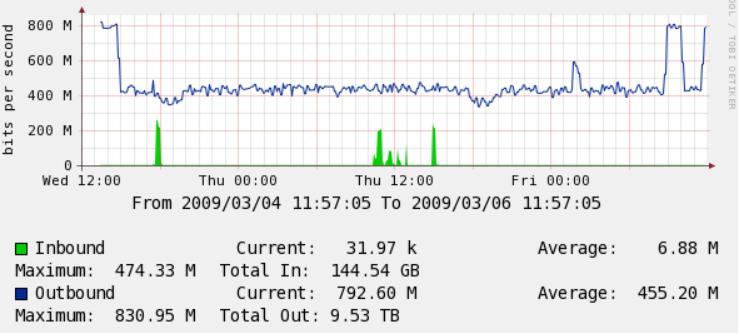
Cacti 64bit graphing with Total Bandwidth

Cacti is a great graphing tool for monitoring your network traffic, and especially for capacity planning. However what if the links you utilise are greater than 100mbit? Cacti by default will only graph up to 120mbits with the graphs since they are only 32bit graph counters. In order to graph more than 120mbits of bandwidth 64bit counters are required. I have included as part of this post a XML import file for cacti which allows you to use 64bit counters but with Total Bandwidth as well recorded from the graphs. Thanks to a friend of mine (Mr DS) for finding this on the cacti forums. (http://forums.cacti.net/about4160-0-asc-0.html)

Download: 64bit Counter Cacti Template with Total Bandwidth

Sample Graph of 1Gigabit link with 64bit Counter Total Bw SNMP v2 probe:

[ad#googleadd1]

2 Comments

Foreign Battery ADSL

Well, ever since I started this site, Ive noticed that my DSL2 connection has not been that flash, and Ive been experiencing speed/dropout issues. The way I noticed this was that the Cisco 877 was not able to remain synced for more than 1-2 days without dropouts. Upon further investigation I discovered that the modem was receiving a large amount of HEC/CRC errors, around 2000+ each day. However the line seemed to work fine on a Billion 7300, with a Standard profile set on the DSLAM end, but this was still reporting a very high amount of errors. Also the SNR margin was not consistent and would fluctuate wildly from 10dB right down to -2dB. It was worse during nights etc.

So now im expecting anyday now for the Telco to come and fix this issue, as it appears its being caused from one of the poles in the street.

So what is this “Foreign Battery” issue? Well I managed find a few answers..


“Foreign battery will affect your ADSL sync. From my understanding foreign battery is unwanted voltage getting onto the line from somewhere. Which means the there is more voltage on the line than is normal, which in turn will give noise and interference on the line and cause issues with devices.”

“The high frequency of ADSL will often get through a poor or open circuit joint but low voltage VF (voice) signals will not. ADSL will work over most types of faulty lines surprisingly well, except for a Foreign Battery fault where your line is crossed with the battery side of another line, quite low voltages will kill ADSL but may not even be noticed on the phone.”

So if you are having these types of issues yourself, it could be a “Foreign Battery” fault!

[ad#googleadd1]

5 Comments

Cisco IOS Feature Navigator

So you got your cisco device, but what if you want to quickly find the right IOS, and other software releases for features you want to run on your network. There are many different versions of the cisco IOS for each device. I came accross this handy cisco website which you can use to research software releases by searching by image name, platform, product code etc. Once you select what you want, it will give you more information about the particular IOS for your device, and what it can run.

So checkout:

http://tools.cisco.com/ITDIT/CFN/jsp/index.jsp

I believe it will come in quite handy!

Leave a Comment