Press "Enter" to skip to content

Category: Cisco

Cisco 5506-X WAN Speedtesting

I recently got the new Cisco 5506-X and I thought to benchmark the WAN speed on it and see what it can actually push. I got 3 x 100mb WAN links and connected them in and assigned 3 outside interfaces and decided to run a 5GB speedtest file on each link terminating. I used the PBR (Policy Based Routing) on the device to and some access lists to forward traffic where I wanted it to go.
Here are some of the specs of the 5506-X using show version:

Hardware:   ASA5506, 4096 MB RAM, CPU Atom C2000 series 1250 MHz, 1 CPU (4 cores)

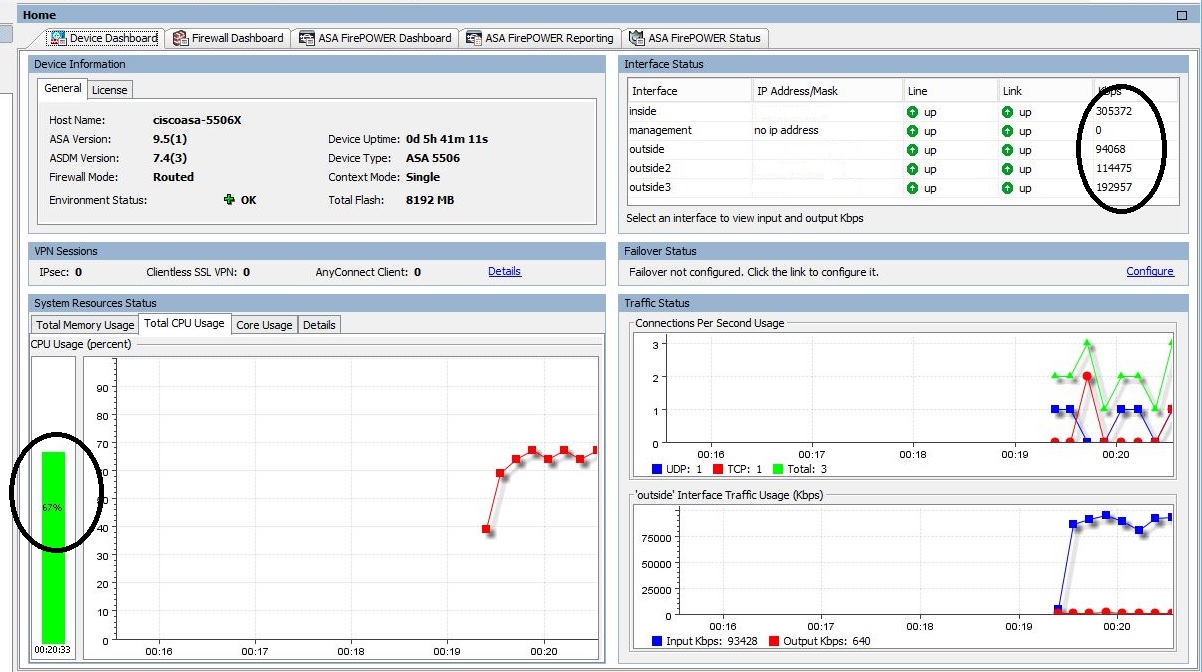
Upon testing and maxing the speed at 300mbit across 3 interfaces, the CPU on the device reached to 67%. This is only with the firewall on, and no other features turned on such as the Firepower. Upon looking at the Cisco documentation they mention at minimum it will do is 750mbit for firewall performance. If 3 WAN links @300mbit already reach 67% CPU, if I did add another link it, the CPU will nearly be maxed out at 400mbits. In my opinion, I think the 750mbits will not be reached or very difficult to get to as the CPU on the device will be quite high and packets might start getting dropped. Anyone else done speedtesting on it? Let me know your thoughts!

Here is a screenshot of the WAN performance of the ASA 5506-X @ 300mbit.
Cisco ASA5506-X
Cisco ASA5506-X @ 300mbit WAN speed


7 Comments

Opening the Cisco Cool Switch WS-C2960X-24PSQ-L

I just ended up buying a new Cisco 24 port switch WS-C2960X-24PSQ-L . This switch is awesome, and these are the main reasons I decided to purchase this switch.

– Silent , No Fans
– 24 Gigabit Ports, and 4 Uplinks
– PoE on 8 Ports

This is a layer 2 switch, and so far im very impressed with it. If you’re a Cisco fan and want something silent this is the one. I have made this video so you can have a look and decide for yourself 🙂

Leave a Comment

Upgrading Cisco TAR image

I was recently going to upgrade a Cisco image on a switch but wanted to keep the webinterface etc and to update to the next image release which was a tar file. The easiest way of doing this and upgrading the image … simply to enter one command..

Switch#archive download-sw /overwrite tftp://tftpip/file.tar

Basically you can specify either your TFTP or FTP server where the TAR file is and download it to the switch. Once this is downloaded it will overwrite anything on the switch. Most Cisco switches dont have enough space for an additional image so the overwrite parameter is useful. After the upgrade is complete , simply issue reload. If you prefer to reload it at the same time you could include /reload parameter after the overwrite.

Switch#archive download-sw /overwrite /reload tftp://tftpip/file.tar


Leave a Comment

Cisco opens up EIGRP protocol

Another news I saw today, im only 3 months late with hearing this, but it appears Cisco is opening up their EIGRP protocol to other vendors.. now how long until Juniper and HP bring in EIGRP to their gear only time will tell..

Leave a Comment